Choosing the right tattoo photo printer can save time, reduce tracing errors, and help you produce cleaner stencil transfers from phones, tablets, or computers.
Below, we focus on portable, wireless, and artist-friendly options that make it easier to turn artwork into reliable tattoo-ready prints.
Best 10 Tattoo Photo Printer Picks for 2026
Portable Beginner-Friendly Pick
Phomemo M08F Tattoo Stencil Printer

- Lightweight 2-pound wireless design
- Bluetooth for phones, tablets, and computers
- Free app with stencil and preview tools
Best For: Mobile artists and beginners needing easy portable stencil printing
Kid-Friendly Creative Pick
Temporary Tattoo Maker for Kids

- Inkless, mess-free thermal printing
- AI modes turn photos and doodles into art
- Includes sheets, markers, and washable designs
Best For: Families wanting a fun temporary tattoo maker for kids
Fast Multi-Size Pick
TATTMUSE Tattoo Stencil Printer

- Connects quickly via Bluetooth or USB
- Four size options for different tattoo placements
- App offers editing, stitching, and AI tools
Best For: Artists who need fast, flexible stencil printing in multiple sizes
Touchscreen Pro Pick
Phomemo M08F Plus Tattoo Printer

- Built-in touchscreen with calibration and self-test
- Sharp thermal output with upgraded firmware
- Bluetooth, USB, and app-based stencil tools
Best For: Advanced artists wanting touchscreen control and crisp stencil detail
Portable Pick
Compact Bluetooth thermal stencil printer

- Lightweight, bag-friendly design
- Bluetooth and USB connectivity
- Inkless thermal printing lowers cost
Best For: Artists who need a portable, low-cost stencil printer
Multi-Size Choice
ORGBRO X8 multi-size stencil printer

- A4/A5/A6 paper support
- Easy-to-use editing app
- Wireless for mobile, USB for PC
Best For: Users who want flexible paper sizes and simple app editing
Fast Transfer Option
Itari wireless fast stencil printer

- Quick Bluetooth setup from a phone
- App supports editing and previews
- Wrinkle-resistant printing mode
Best For: Artists who want quick wireless line-art stencil transfers
Editor’s Choice
TATTMUSE 2026 Portable Tattoo Stencil Printer

- Wrinkle-resistant thermal printing
- Bluetooth and USB-C compatibility
- 800+ designs plus AI tools
Best For: Artists and beginners who want portable, app-driven stencil printing
Travel Pick
Itari Wireless Tattoo Stencil Printer Kit
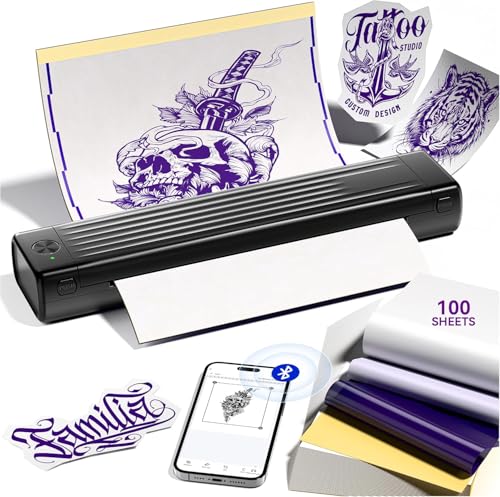
- Bluetooth setup for fast pairing
- Thermal prints in about 60 seconds
- Includes 100 transfer sheets and app tools
Best For: Beginners and mobile artists who want a quick wireless stencil kit
Studio Upgrade
TATTMUSE 2026 Bluetooth Tattoo Printer

- Compact, battery-powered portable design
- Bluetooth and USB-C connectivity
- 800+ designs with photo-to-outline tools
Best For: Artists who want a lightweight stencil printer for studio or travel
Portable Beginner-Friendly Pick – Phomemo M08F Tattoo Stencil Printer
If you want a tattoo photo printer built for straightforward stencil work, the Phomemo M08F is a practical Bluetooth option for artists and beginners. It keeps the workflow simple with phone, tablet, and computer compatibility, plus a free app that covers basic editing, stencil generation, previewing, and anti-wrinkle mode.
Best For: Mobile tattoo artists and first-time users who want a lightweight wireless stencil printer with easy app controls.
Pros:
- Lightweight 2-pound design makes it easy to carry to appointments or conventions.
- Bluetooth support works with Android, iOS, Windows, macOS, and ChromeOS devices.
- Free app includes stencil tools, image cutting, preview, and a tattoo design library.
- Inkless thermal printing avoids ink cartridges and cleanup hassles.
Cons:
- Works exclusively with Phomemo tattoo stencil paper.
- Not aimed at users who need advanced onboard controls.
Overall, the M08F is a solid entry-level tattoo stencil printer if portability and simple setup matter most. Its battery-powered, wireless design makes it especially convenient for on-the-go stencil printing.
Kid-Friendly Creative Pick – Temporary Tattoo Maker for Kids
This tattoo photo printer is designed more for playful customization than professional stencil work. With a free app and AI-powered modes, kids can turn photos, doodles, and sketches into temporary body art without needing drawing skills or ink cartridges.
Best For: Families looking for a washable, inkless temporary tattoo maker with simple app-based creativity tools.
Pros:
- Inkless thermal printing keeps cleanup simple and mess-free.
- AI app modes include sketch-to-image, photo-to-line-art, portrait anime, and more.
- Includes 40 transfer sheets and 4 markers to get started.
- Temporary designs are washable and made for short-term wear.
Cons:
- Built for kids and casual use, not professional tattoo studio workflows.
- Temporary art lasts only 24-72 hours.
As a creative gift, this model stands out for fun and ease of use. It is a better fit for playful photo-to-tattoo projects than for serious stencil production.
Fast Multi-Size Pick – TATTMUSE Tattoo Stencil Printer
If you need a tattoo photo printer that emphasizes speed and flexibility, the TATTMUSE A88U is built for fast stencil creation. It connects by Bluetooth or USB, supports multiple device types, and offers four size options so you can match the transfer to the tattoo placement.
Best For: Tattoo artists and beginners who want quick, detailed stencil printing with multiple size options.
Pros:
- Bluetooth setup is designed to connect in about 3 seconds.
- Anti-wrinkle mode and high-definition printing help produce sharp transfers.
- Four size options support everything from full-back pieces to smaller arm tattoos.
- App includes editing, large-image stitching, and AI generation tools.
Cons:
- AI features require a subscription after the free trial.
- At 1.3 pounds, it is portable but not the lightest option here.
This printer is a strong fit if you want more control over stencil sizing and faster prep time. It blends beginner-friendly app features with enough flexibility for working artists.
Touchscreen Pro Pick – Phomemo M08F Plus Tattoo Printer
The Phomemo M08F Plus is a tattoo photo printer aimed at artists who want more control at the device itself. Its touchscreen, calibration tools, and onboard functions make it easier to manage stencil work without relying entirely on the app.
Best For: Advanced tattoo artists who want a lightweight thermal stencil printer with touchscreen control and professional-level clarity.
Pros:
- Smart touchscreen adds auto-shutdown, brightness adjustment, calibration, and self-test printing.
- Upgraded firmware and thermal printing focus on sharp, detailed stencil output.
- Bluetooth and USB support works across phones, tablets, and computers.
- Includes a free app with stencil generation, preview, anti-wrinkle mode, and design library access.
Cons:
- Only works with Phomemo tattoo stencil paper.
- Higher-end features may be more than casual users need.
The M08F Plus is a good step up if you want a compact printer with more built-in control and refined output. It is especially appealing for artists who value precision and a cleaner workflow.
Portable Pick – Compact Bluetooth thermal stencil printer
If you want a tattoo photo printer-style workflow for fast stencil creation, this portable thermal model is built for simple mobile use. It connects by Bluetooth for phones and via USB for PCs, and its inkless setup helps keep operating costs down while staying easy to carry to appointments or shop work.
Best For: Tattoo artists and beginners who want a lightweight, wireless stencil printer with low ongoing cost.
Pros:
- Very compact and light at about 1 lb, so it is easy to pack and move.
- Bluetooth support for mobile devices plus USB support for computer use.
- Inkless thermal printing keeps setup simple and avoids ink costs.
- Built-in dual batteries are rated for long standby and substantial page output per charge.
Cons:
- Monochrome output only, so it is limited to stencil-style printing.
- Maximum sheet capacity is modest compared with larger shop printers.
- Best suited to transfer work rather than general photo printing.
Overall, this is a practical tattoo photo printer alternative if your priority is portability, wireless convenience, and low-cost stencil output. The app support and broad device compatibility make it a straightforward choice for everyday tattoo prep.
Multi-Size Choice – ORGBRO X8 multi-size stencil printer
For buyers comparing a tattoo photo printer with more flexible stencil handling, the ORGBRO X8 stands out for its A4/A5/A6 support and easy wireless workflow. It is designed for phones, tablets, and PCs, and its app adds simple editing tools plus outline conversion for faster tattoo prep.
Best For: Tattoo artists and beginners who want a multi-size, app-driven stencil printer with broad device support.
Pros:
- Supports A4, A5, and A6 tattoo transfer paper for added flexibility.
- Bluetooth pairing works with Android and iOS devices, with USB use for computers.
- “Tattoo Go” app includes image editing, batch printing, and outline conversion.
- Rechargeable battery and lightweight build make it easy to carry.
Cons:
- PC use requires USB connection; Bluetooth is not available for computers.
- Print output is monochrome, so it is not meant for color designs.
- Resolution is listed at 203 dpi, which is geared toward stencil work rather than photo printing.
The X8 is a strong choice if you want a tattoo photo printer-like workflow with more paper-size options and helpful app tools. It is especially appealing for users who value portability and a cleaner, no-ink process.
Fast Transfer Option – Itari wireless fast stencil printer
If you are shopping for a tattoo photo printer substitute focused on quick stencil transfers, the Itari A886 is designed for speed and simplicity. It connects by Bluetooth, prints monochrome line art, and includes app tools that help beginners and working artists move from design to stencil without much setup.
Best For: Beginners and professional artists who want a fast, wireless stencil printer for line-art transfer.
Pros:
- Bluetooth connection can pair to a phone quickly for wireless printing.
- Thermal printing finishes stencil jobs quickly, with the brand noting 60-second printing.
- App includes editing, previews, image stitching, and a tattoo gallery.
- Wrinkle-resistant mode helps keep paper flatter during printing for clearer results.
Cons:
- Works only with Itari tattoo paper, so paper choice is limited.
- Monochrome output only, making it best for line art rather than complex color work.
- AI features in the app require a subscription after the free trial.
This model is a sensible pick if your priority is fast stencil output and easy mobile use. It is built more for practical tattoo transfer than for general-purpose printing, which keeps it focused and efficient.
Editor’s Choice – TATTMUSE 2026 Portable Tattoo Stencil Printer
If you want a tattoo photo printer that’s built for fast, clean stencil work, this TATTMUSE model is a strong all-around pick. It focuses on wrinkle-resistant printing, sharp monochrome output, and wireless convenience, so it fits well into both studio and mobile workflows.
Best For: Artists and beginners who want a portable, ready-to-use tattoo stencil printer with app-based design tools.
Pros:
- Patented wrinkle-resistant mode helps keep transfer paper flat during printing.
- Upgraded print head is designed for faster, sharper stencil results.
- Bluetooth support plus USB-C makes it easy to use with phones, tablets, and laptops.
- Smart app includes 800+ free designs, preview tools, and AI stencil creation.
Cons:
- Monochrome output only, so it’s for stencil work rather than full-color printing.
- For best results, the notes recommend using TATTMUSE transfer paper.
- Regular users only get 6 AI designs unless they upgrade to Pro+.
Overall, this is a practical choice if you value portability, simple setup, and a strong app feature set in a tattoo stencil printer. It’s especially appealing if you want a compact unit that can travel easily while still producing precise line art.
Travel Pick – Itari Wireless Tattoo Stencil Printer Kit
The Itari tattoo photo printer is aimed at users who want a quick, simple stencil workflow without a wired setup. Its Bluetooth pairing, thermal printing, and included transfer paper make it a convenient option for beginners and traveling artists alike.
Best For: Beginners and mobile tattoo artists who want a fast wireless stencil printer kit.
Pros:
- Wireless Bluetooth connection is designed to pair quickly with a phone.
- Thermal printing can produce tattoo prints in about 60 seconds.
- Patented wrinkle-resistant technology helps keep paper flat for clearer results.
- Smart app includes free editing, previews, image stitching, and a tattoo gallery.
Cons:
- Monochrome only, and the notes recommend it mainly for line art.
- AI features in the app require a subscription after the free trial.
- Best results depend on using Itari tattoo paper.
As a travel-friendly tattoo stencil printer, this kit stands out for quick setup and beginner-friendly operation. It makes sense if you want a compact tool for practice, pop-ups, or temporary tattoo work without a complicated learning curve.
Studio Upgrade – TATTMUSE 2026 Bluetooth Tattoo Printer
This TATTMUSE tattoo photo printer is a compact option for artists who want the same wrinkle-resistant printing and app-based stencil creation in a lighter package. It’s designed for quick Bluetooth use, straightforward laptop connectivity, and efficient thermal output for studio or on-the-go work.
Best For: Tattoo artists and beginners who want a lightweight Bluetooth stencil printer with strong app features.
Pros:
- Wrinkle-resistant mode helps keep transfer paper smooth during printing.
- Lightweight, battery-powered design is easy to carry in a bag.
- Smart app offers 800+ free designs, photo-to-outline conversion, and image splitting.
- Works with phones, tablets, and laptops via Bluetooth or USB-C.
Cons:
- Monochrome printing only.
- The notes say it is compatible only with TATTMUSE tattoo paper for best quality.
- If you need lots of designs, the larger 100-sheet kit may be the better buy.
For buyers who want a portable tattoo stencil printer with modern app tools, this model is a very practical fit. It balances size, convenience, and feature depth, especially if you want a unit that can move easily between studio and travel use.
How We Picked the Best Tattoo Photo Printer
We focused on Tattoo Photo Printer models that are practical for real studio use: consistent thermal output, easy wireless setup, broad device compatibility, and portable designs that suit both travel and shop workflows. We also weighed included transfer paper, beginner-friendly controls, and whether the printer can handle different stencil sizes.
Quick Comparison
If you want the fastest setup, choose a Bluetooth portable model with simple app pairing. If you need more flexibility, look for printers that support multiple paper sizes or wider-format transfers. For beginners, bundled kits with extra transfer sheets are a strong value; for heavier use, prioritize reliability and clearer output over extra features.
Key Buying Factors for a Tattoo Photo Printer
Print Quality and Line Clarity
The most important factor is stencil sharpness. Fine lines, shaded areas, and small details should transfer clearly without smudging or broken edges. Thermal consistency matters more than flashy extras.
Connectivity and Compatibility
A good Tattoo Photo Printer should connect easily to phones, tablets, and PCs. Bluetooth is convenient, but make sure the app and device support are stable before buying.
Portability and Workflow
Compact printers are ideal for mobile artists, guest spots, and small studios. If you print frequently, look for a model that is easy to load, quick to pair, and simple to maintain.
Paper Support and Size Range
Consider whether you need standard stencil sheets or a printer that can handle multiple sizes. A wider size range is helpful for larger designs, while bundled transfer paper adds immediate value.
Ease of Use
Beginners should favor straightforward controls, clear app instructions, and models marketed for fast setup. Artists who already have a workflow may prefer advanced features only if they improve speed or flexibility.
Who Should Buy Which Tattoo Photo Printer?
Beginners should choose an easy-to-use Tattoo Photo Printer with included transfer paper and simple Bluetooth pairing. Working artists and apprentices may want a more dependable portable unit for daily use. If you need versatility, pick a printer that supports multiple paper sizes. If you prioritize budget value, look for kits with extra sheets so you can start printing right away.