Choosing the right tattoo studio photo printer can make stencil prep faster, cleaner, and more consistent. For busy artists, the best option is the one that fits your workflow, paper sizes, and portability needs.
In this roundup, we focus on practical features that matter in real studios: wireless setup, thermal output, compatibility, and transfer reliability for both beginners and working professionals.
Best 10 Tattoo Studio Photo Printer Picks for 2026
Starter Pick
Phomemo M08F Tattoo Stencil Printer

- Bluetooth wireless printing for phones, tablets, and PCs
- Inkless thermal output with app-based stencil tools
- Lightweight 2 lb build with rechargeable battery
Best For: Beginners and traveling tattoo artists who want a simple portable stencil printer
On-the-Go Studio Choice
NULLTONEX Portable Tattoo Stencil Printer

- 1.17 lb compact body for easy travel
- Prints skin-ready transfers in about 25 seconds
- Bluetooth plus USB support with included papers
Best For: Mobile artists, conventions, and home studios needing quick portable stencil printing
Advanced Workflow Upgrade
Phomemo M08F Plus Touchscreen Printer

- Smart touchscreen with calibration and self-test tools
- Detailed inkless thermal prints for precise stencils
- Bluetooth, USB, and broad OS compatibility
Best For: Experienced tattoo artists who want touchscreen convenience and precision
Best 2-in-1 Value
Bagana M9 Tattoo & Document Printer
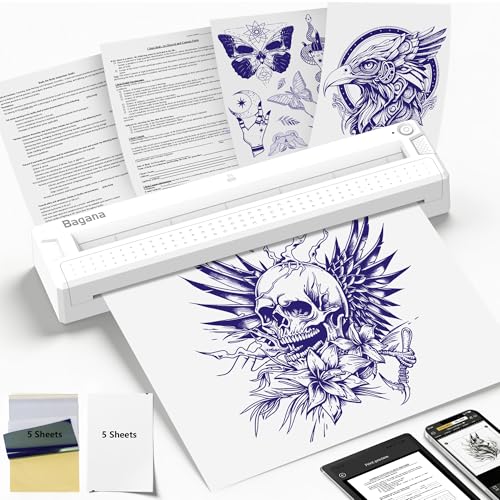
- Prints stencils plus studio documents in one machine
- Bluetooth and USB-C support for mobile and desktop use
- Compact 1 lb body with rechargeable battery
Best For: Shop owners and mobile artists who want a single compact printer for stencils and paperwork
Wireless Starter Pick
Itari A886 Portable Tattoo Stencil Printer

- Bluetooth setup works with phone, tablet, or PC.
- Thermal, monochrome printing is built for line art.
- Wrinkle-resistant mode and app editing speed up stencil prep.
Best For: Beginners and mobile artists who want fast stencil printing
Portable 3-in-1 Pick
ORGBRO X8 Tattoo Transfer Printer

- Supports A4, A5, and A6 transfer paper sizes.
- Rechargeable and lightweight for easy travel.
- App tools help convert photos into outlines fast.
Best For: Artists who want a compact printer with broad paper-size support
Travel-Ready Upgrade
TATTMUSE A887 Wireless Tattoo Stencil Printer

- Compact, battery-powered design is easy to carry.
- App offers 800+ designs, outline tools, and AI features.
- Bluetooth and USB-C support phones, tablets, and laptops.
Best For: Traveling artists who want a compact, app-driven stencil printer
Fast Wireless Starter Pick
Itari A886 Tattoo Stencil Printer Kit
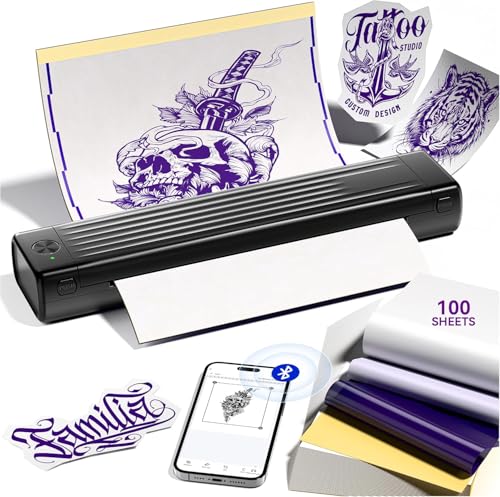
- Bluetooth connection for quick phone setup
- Includes 100 pcs transfer paper
- Monochrome thermal printing for line art
Best For: Beginners and mobile artists who need a quick stencil workflow
Portable App-Driven Upgrade
TATTMUSE 2026 Tattoo Stencil Printer

- Bluetooth plus USB-C connectivity
- Over 800 free designs in the app
- Lightweight body with rechargeable battery
Best For: Traveling artists and studios that want app tools with portable setup
High-Capacity Compact Choice
Phomemo TP31 Mini Tattoo Stencil Printer

- Includes 120 pcs transfer paper
- 1-pound body with rechargeable battery
- Sharp thermal printing with app editing tools
Best For: Studios and artists who want a compact printer with a larger starter supply
Starter Pick – Phomemo M08F Tattoo Stencil Printer
If you want a tattoo studio photo printer-style workflow for stencil output, the Phomemo M08F is a compact wireless option built specifically for tattoo use. It runs on thermal, inkless printing, connects by Bluetooth or USB to phones, tablets, laptops, and desktops, and comes with a smart app for basic editing and stencil prep.
Best For: Tattoo artists and beginners who want a portable, easy-to-use stencil printer with broad device support.
Pros:
- Lightweight, wireless design at about 2 pounds for mobile use
- Compatible with Android, iOS, Windows, macOS, and ChromeOS
- Inkless thermal printing avoids clogging and cleanup
- App includes stencil generator, preview, cutting, and design library tools
Cons:
- Works exclusively with Phomemo tattoo stencil paper
- Not aimed at advanced touchscreen-style workflow control
Overall, this is a practical entry-level tattoo stencil printer for artists who value portability and simple setup over premium controls. It covers the core needs well and includes starter transfer paper so you can begin printing quickly.
On-the-Go Studio Choice – NULLTONEX Portable Tattoo Stencil Printer
The NULLTONEX tattoo stencil printer is built for artists who need a portable, no-fuss way to turn digital designs into skin-ready transfers. It uses inkless thermal printing, supports standard Letter, A4, and A5 paper sizes, and can connect by Bluetooth or USB for a flexible tattoo studio photo printer setup.
Best For: Traveling tattooists, home studios, and convention work that need fast stencil printing with standard paper sizes.
Pros:
- Very compact and lightweight at 1.17 lbs
- Fast transfer output, with prints in about 25 seconds
- Supports Bluetooth on Android/iOS and USB on Windows/macOS
- Includes both standard thermal paper and professional tattoo transfer paper
Cons:
- App and workflow are tied to the SharpFox software ecosystem
- Less specialized in extras than more advanced touchscreen models
This is a strong all-around portable tattoo printer for artists who want speed, mobility, and flexible device connections. The included paper and battery capacity make it especially useful for full-day sessions away from a fixed station.
Advanced Workflow Upgrade – Phomemo M08F Plus Touchscreen Printer
For a tattoo studio photo printer workflow that puts more control at your fingertips, the Phomemo M08F Plus adds a smart touchscreen to the familiar portable thermal format. It prints inklessly, supports Bluetooth and USB, and includes app tools for stencil generation, previewing, and design editing.
Best For: Advanced tattoo artists who want touchscreen control and a more refined stencil-printing process.
Pros:
- Smart touchscreen with brightness adjustment, calibration, and self-test functions
- Razor-sharp thermal printing for detailed stencil work
- Supports phones, tablets, laptops, and desktops across major operating systems
- Large-capacity battery handles around 140 pages per charge
Cons:
- Uses Phomemo tattoo stencil paper exclusively
- Battery life per charge is lower than some higher-capacity portable rivals
The M08F Plus stands out when you want cleaner control and a more polished setup than a basic stencil printer can offer. It is especially appealing for artists who work on complex designs and want fast on-device adjustments before printing.
Best 2-in-1 Value – Bagana M9 Tattoo & Document Printer
The Bagana M9 is a practical tattoo studio photo printer alternative if you want one compact machine for stencils and paperwork. It uses ink-free thermal printing, pairs with phones and tablets over Bluetooth, and also works with Windows and Mac via USB-C for a streamlined studio workflow.
Best For: Tattoo shop owners and mobile artists who want both stencil printing and basic studio document output in one device.
Pros:
- 2-in-1 design handles tattoo stencils and studio documents
- Very portable at about 1 lb with rechargeable battery power
- Stable Bluetooth and USB-C connections across mobile and desktop devices
- App supports resizing, splicing, templates, and one-click printing
Cons:
- Monochrome thermal output only
- Includes a modest paper bundle compared with some kits
This model makes sense if you want one compact printer to reduce clutter and cover more of the daily shop workflow. It is especially useful for studios that need quick stencil production plus forms or invoices without adding another machine.
Wireless Starter Pick – Itari A886 Portable Tattoo Stencil Printer
If you want a tattoo studio photo printer focused on stencil output, the Itari A886 is built for fast wireless use and simple mobile control. It pairs with phones, tablets, and PCs over Bluetooth, prints monochrome line art, and is aimed at artists who want a quick way to turn designs into transfer-ready stencils.
Best For: Beginners and working tattoo artists who want a portable Bluetooth stencil printer for quick line-art transfers and temporary tattoo designs.
Pros:
- Wireless Bluetooth setup connects from a phone in seconds.
- Thermal printing makes stencil creation fast, with prints in about 60 seconds and output in as little as 10 seconds after setup.
- Wrinkle-resistant mode helps keep transfer paper flatter during printing.
- Includes 10 sheets of transfer paper and supports a built-in design app with editing and preview tools.
Cons:
- Monochrome only, so it is best suited to line art rather than full-color images.
- It only supports Itari tattoo paper for optimal results.
- AI features in the app require a subscription after the free trial.
Overall, the Itari A886 is a practical choice if portability and speed matter more than advanced media flexibility. It is a strong fit for simple stencil work, travel setups, and beginners learning the workflow of a tattoo studio photo printer.
Portable 3-in-1 Pick – ORGBRO X8 Tattoo Transfer Printer
The ORGBRO X8 is a tattoo studio photo printer style option for artists who need portability plus paper-size flexibility. It supports A4, A5, and A6 transfer paper, runs wirelessly on a rechargeable battery, and is designed to deliver quick monochrome stencil prints without ink or cartridges.
Best For: Tattoo artists and beginners who want a lightweight wireless stencil printer that works with multiple paper sizes and multiple device types.
Pros:
- Lightweight 1.6 lb design with a built-in battery for portable use.
- Supports A4, A5, and A6 transfer paper, with 10 sheets of each size included.
- Direct printing avoids peeling yellow paper and helps keep paper flat.
- Compatible with phones, tablets, and many desktop systems, including Windows, macOS, ChromeOS, and Linux.
Cons:
- PC use requires USB Type-C and downloaded drivers rather than Bluetooth.
- Monochrome output only, so it is limited to stencil-style prints.
- Rated at 203 dpi, which is practical for stencils but not photo-style detail.
For studios that want a versatile stencil workflow, the X8 stands out for format support and wide compatibility. It is a sensible choice when you want one compact device that can move between mobile and desktop setups.
Travel-Ready Upgrade – TATTMUSE A887 Wireless Tattoo Stencil Printer
If you need a tattoo studio photo printer that is compact but still feature-rich, the TATTMUSE A887 is aimed at fast stencil work on the go. It uses wireless thermal printing, supports phones, tablets, and laptops, and adds app tools for previews, outline conversion, and multi-part design splitting.
Best For: Tattoo artists and beginners who want a lightweight wireless stencil printer with strong app tools and quick setup for travel or studio use.
Pros:
- 60% smaller and battery-powered for easy transport.
- Wrinkle-resistant mode helps keep prints flat and sharp.
- App includes 800+ free tattoo designs, editing tools, and AI stencil creation.
- Bluetooth and USB-C support make it usable with phones, tablets, and laptops.
Cons:
- Output is monochrome only, so it is meant for stencil work rather than color printing.
- Regular users only get a limited number of AI-created designs unless they upgrade.
- For best results, the notes recommend using TATTMUSE transfer paper.
As a modern portable stencil printer, the A887 balances speed, software features, and travel-friendly design well. It is a solid pick if you want an easy, app-driven workflow for creating tattoo transfers quickly.
Fast Wireless Starter Pick – Itari A886 Tattoo Stencil Printer Kit
If you want a tattoo studio photo printer-style workflow for stencil prep, the Itari A886 focuses on speed and simplicity. It uses Bluetooth and thermal printing to produce monochrome tattoo designs quickly, with the brand noting a fast 3-second phone connection and about 60-second print completion for tattoo prints.
Best For: Beginners, traveling artists, and studios that want a quick wireless stencil printer with included transfer paper.
Pros:
- Includes 100 pcs transfer paper to get started right away.
- Wireless Bluetooth setup is designed for fast phone connection.
- Thermal printing and upgraded print head aim for clear tattoo results.
- Smart app offers editing, previews, large-image stitching, and tattoo gallery access.
Cons:
- Monochrome output only, so it is meant for line art rather than color work.
- Wrinkle-resistant mode can leave anti-wrinkle lines on the paper edges.
- AI features in the app require a subscription after the free trial.
Overall, this is a practical entry-level tattoo studio photo printer option if you value wireless convenience and a generous paper bundle over advanced output types. It is especially appealing for simple stencil workflows and temporary tattoo use.
Portable App-Driven Upgrade – TATTMUSE 2026 Tattoo Stencil Printer
The TATTMUSE 2026 version is a strong tattoo studio photo printer choice for artists who want portability plus app-based design tools. It uses wireless Bluetooth for phones and tablets, USB-C for laptops, and thermal printing for clean monochrome stencil output.
Best For: Tattoo beginners and studio artists who want a lightweight, portable printer with more app tools and multi-device support.
Pros:
- Lightweight, battery-powered, and small enough to travel easily.
- Supports phones, tablets, and laptops with Bluetooth and USB-C options.
- Smart app includes over 800 free tattoo designs and editing tools.
- Wrinkle-resistant mode and upgraded print head are designed for sharper results.
Cons:
- Wrinkle-resistant mode can leave lines on the paper edges.
- TATTMUSE notes optimal results require its own tattoo paper.
- Advanced AI tools require a Pro+ subscription.
For users who want more flexibility than a basic stencil printer, this model stands out for its app resources and device compatibility. It is a practical pick for studio use where portability and quick setup matter.
High-Capacity Compact Choice – Phomemo TP31 Mini Tattoo Stencil Printer
For a tattoo studio photo printer workflow built around clarity and volume, the Phomemo TP31 is positioned as a compact but capable stencil printer. It uses thermal technology, prints without ink, and includes 120 pieces of transfer paper for a larger starter supply.
Best For: Tattoo beginners, professionals, and temporary tattoo users who want a lightweight printer with a bigger paper bundle.
Pros:
- Includes 120 pcs transfer paper, more than the smaller starter kits.
- Weighs about 1 pound and uses a rechargeable 2200mAh battery.
- App supports editing, stencil creation, preview, and a design library.
- Brand says upgraded firmware delivers sharp, detailed stencil output.
Cons:
- Advanced app features require a Pro subscription.
- Uses a specific paper size, so regular A4 or Letter sheets must be trimmed.
- Monochrome output only for stencil work.
The TP31 is a solid option if you want a portable stencil printer that balances detail, battery life, and included supplies. It fits well in a studio where quick, repeatable stencil prep is more important than general photo printing.
How We Picked the Best Tattoo Studio Photo Printer
We prioritized models that are easy to use, travel-friendly, and suitable for repeated stencil production in a studio setting. The best options balance print consistency, device compatibility, and a simple setup that won’t slow you down between appointments.
We also looked at bundle value, transfer paper inclusion, and whether each Tattoo Studio Photo Printer is better suited to mobile artists, apprentices, or high-volume shop use.
Quick Comparison
Portable Bluetooth models are the most flexible choice for artists who work between stations or on the go. Larger-format printers are better if you need more stencil layout room or want broader paper-size support. Bundle-heavy kits can be a smart buy for beginners because they reduce the need for separate accessory purchases.
Key Buying Factors for Tattoo Studio Photo Printer
Print Size and Paper Compatibility
Check whether the printer supports the stencil sizes you use most often. A4 support is common and versatile, while smaller formats can be useful for flash, detail work, or limited workspace.
Portability and Power
If you move between shops, conventions, or client homes, choose a lightweight wireless unit with rechargeable power. A compact body is helpful, but don’t sacrifice stability or output consistency for size alone.
Wireless Workflow
Bluetooth printing can simplify setup from a phone, tablet, or laptop. For a Tattoo Studio Photo Printer, a smooth app or driver experience matters as much as the hardware because it affects speed during consultations and prep.
Transfer Quality
Stencil clarity, line sharpness, and even thermal output are essential. Look for models known for consistent transfers, especially if you work with fine-line designs or detailed lettering.
Included Supplies and Support
Starter bundles with transfer paper can improve overall value, especially for beginners. They also help you test the machine right away without sourcing extras separately.
Who Should Buy Which Tattoo Studio Photo Printer?
Beginners should look for an easy Bluetooth model with a good starter pack and straightforward controls. Traveling artists may prefer the lightest portable printer with rechargeable convenience. Studio professionals who handle varied stencil sizes should lean toward models with broader paper support and steadier output. If you want a Tattoo Studio Photo Printer for frequent use, prioritize reliability and workflow efficiency over extra features you may rarely use.