The best webcams for content creators make it easier to produce sharp, well-framed video without a complicated camera setup. The right model can improve image quality, autofocus, audio, and on-camera consistency for streaming, tutorials, meetings, and live content.
Our roundup compares 10 creator-focused webcams, including 4K models with AI tracking, PTZ movement, dual-camera designs, HDR, fast autofocus, and built-in noise reduction.
Best 10 Webcams for Content Creators Picks for 2026
Best Premium PTZ Pick

- 4K video from a large 1/1.3-inch sensor
- Physical AI tracking with pan and tilt
- Directional mics and Stream Deck integration
Best For: Streamers and presenters needing premium tracking and workflow control
Best Manual Control

- 4K capture at up to 60 FPS
- Sony STARVIS 2 sensor with Prime Lens
- Supports 49mm lens filters and Camera Hub control
Best For: Creators who prefer fixed framing and DSLR-like image adjustments
Best Compact 4K Webcam

- 4K video with a 1/2-inch CMOS sensor
- AI framing, autofocus, and gesture controls
- 40.5-gram body with USB-C plug-and-play setup
Best For: Mobile creators and remote workers needing portable automated framing
Most Versatile Framing
EMEET C60E Dual-Camera 4K Webcam
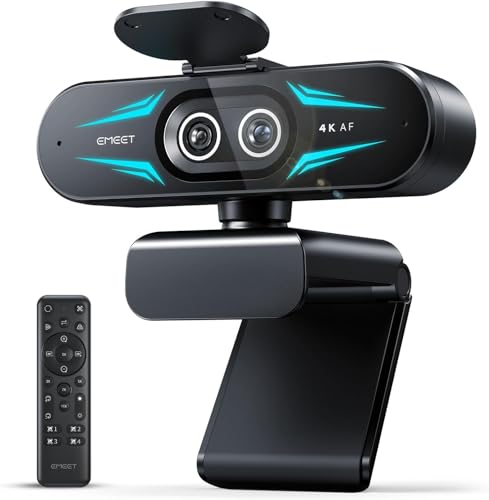
- Dual-camera wide and telephoto views
- Up to 11X zoom with PDAF autofocus
- Remote, software, and RGB controls
Best For: Creators switching between room-wide and close-up shots
Best AI Tracking

- AI pan-and-tilt tracking keeps you framed
- 4K HDR video from a 1/2-inch sensor
- Gesture, smartphone, DeskView, and Whiteboard modes
Best For: Creators who present while moving around the room
Best for Comfort
Logitech MX Brio Ultra HD 4K Webcam

- 4K at 30fps and 1080p at 60fps
- Detailed image controls through Logitech software
- Privacy cover, Show Mode, and noise-reducing microphones
Best For: Creators who want tunable image quality and privacy
Top-Tier 4K Pick

- 4K video with 1080p at 60 fps
- PDAF autofocus and dual noise-reducing mics
- Built-in adjustable tri-tone ring light
Best For: Creators wanting 4K video and integrated lighting
Flexible 4K Streaming Pick

- 4K at 30 fps or 1080p at 60 fps
- PDAF autofocus with automatic light balancing
- Adjustable 1080p field of view and privacy cover
Best For: Streamers seeking flexible framing and optional software controls
Creator-Friendly 1080p Pick

- Full HD 1080p at 60 fps
- Auto-framing, smart autofocus, and intelligent exposure
- Landscape and portrait mounting options
Best For: Creators wanting polished 1080p video with automatic controls
Best Premium PTZ Pick – Insta360 Link 2 Pro
For content creators who want polished video with minimal manual adjustment, the Insta360 Link 2 Pro is a feature-rich choice among webcams for content creators. Its large 1/1.3-inch sensor, 4K capture, AI tracking, HDR, and directional microphones are designed for streaming, meetings, and mobile presentations.
Best For: Streamers and presenters who want premium image quality, physical AI tracking, and advanced workflow controls.
Pros:
- Large sensor supports detailed 4K video and improved low-light performance.
- Physical pan-and-tilt AI tracking keeps individuals or groups in frame.
- Directional beamforming microphones, natural bokeh, and Stream Deck integration support polished production.
- Includes DeskView, Whiteboard, and 4K Portrait modes.
Cons:
- Not compatible with ARM-based Windows systems or Windows Hello Face Recognition.
- Its advanced controls and PTZ design may be more than casual callers need.
The Link 2 Pro stands out when creator flexibility matters as much as resolution. It is especially compelling for people who move around during presentations or want presets and controls integrated into a repeatable streaming setup.
Best Manual Control – Elgato Facecam 4K
The Elgato Facecam 4K is a strong fit for webcams for content creators who prefer to shape their image manually. It combines 4K at 60 frames per second with a Sony STARVIS 2 sensor, a Prime Lens, HDR support, and software controls intended for a studio-style setup.
Best For: Streamers and video professionals who want high-resolution footage and DSLR-like control rather than automated framing.
Pros:
- Captures 4K video at up to 60 FPS for detailed, smooth footage.
- Sony STARVIS 2 CMOS sensor and Elgato Prime Lens target sharp, vibrant image quality.
- Camera Hub provides customizable effects and image settings.
- Supports standard 49mm lens filters and saves settings with built-in flash memory.
Cons:
- It does not offer the physical AI tracking found on the PTZ models in this roundup.
- Manual controls and filter support may be unnecessary for simple video calls.
Choose the Facecam 4K if you want a fixed camera that behaves more like a traditional production tool. Its 4K60 capture and filter compatibility give creators room to develop a consistent visual style.
Best AI PTZ Value – EMEET PIXY Dual-Camera PTZ
The EMEET PIXY brings several production tools into one webcam, making it an interesting option for webcams for content creators covering movement-heavy formats. Its dual-camera design combines 4K imaging with an auxiliary AI camera for autofocus, exposure, and tracking assistance.
Best For: Fitness instructors, product demonstrators, teachers, podcasters, and streamers who need tracking, PTZ movement, and flexible audio modes.
Pros:
- Dual-camera AI system combines 4K imaging with autofocus and exposure assistance.
- Three-chip tracking system supports smooth motion across a 310-degree pan and 180-degree tilt range.
- Triple-microphone array offers Live, Noise Canceling, and Original Sound modes.
- Includes gesture control, presets, Whiteboard mode, and privacy mode through EMEET STUDIO.
Cons:
- Tripod use requires a separately sold tripod.
- Some features, including detailed controls and presets, depend on the EMEET STUDIO software.
- Its larger 330-gram body is less portable than ultra-compact alternatives.
PIXY is designed for creators who want a self-contained setup instead of separate tracking, audio, and imaging accessories. Its multiple sound modes and broad PTZ movement make it particularly versatile for active presentations and live shows.
Best Compact 4K Webcam – OBSBOT Meet 2
The OBSBOT Meet 2 is a practical pick among webcams for content creators who value portability without giving up 4K capture. Its 1/2-inch sensor, AI framing, autofocus, gesture controls, and compact 40.5-gram design suit mobile workers, streamers, and creators who move between setups.
Best For: Portable creators and remote workers who want quick USB-C setup, automatic framing, and built-in noise reduction.
Pros:
- 1/2-inch CMOS sensor supports clearer, brighter 4K video.
- AI framing adjusts composition for individuals or groups, while autofocus keeps subjects clear.
- Gesture controls can toggle framing and adjust zoom without reaching for software controls.
- Dual omnidirectional noise-canceling microphones reduce wind, keyboard, and ambient noise.
Cons:
- It lacks physical pan-and-tilt movement, relying on AI framing instead.
- The ultra-compact design provides fewer built-in production features than larger PTZ models.
- The camera may become hot during use, which the supplied notes describe as normal.
Meet 2 makes the most sense when convenience and easy transport are priorities. It offers a straightforward single-cable setup and useful automated framing while remaining small enough for travel or flexible desk arrangements.
Most Versatile Framing – EMEET C60E Dual-Camera 4K Webcam
The EMEET C60E stands out among webcams for content creators who need both a wide presentation view and a detailed close-up. Its dual-camera design, hybrid zoom, remote control, and RGB lighting suit streaming, teaching, product demonstrations, and meetings.
Best For: Creators who regularly switch between full-scene and close-up content.
Pros:
- Dual-camera setup provides wide-angle and telephoto views from one webcam.
- Up to 11X hybrid zoom with PDAF autofocus supports flexible framing.
- Remote and EMEET STUDIO controls allow adjustments to zoom, focus, brightness, color, and RGB lighting.
- Two omnidirectional microphones capture audio within a stated 9.8-foot radius.
Cons:
- Zoom is not supported in 4K, 60FPS, or YUY2 modes.
- USB 2.0 connectivity may be less convenient for some modern setups.
- The RGB design may not suit creators seeking a more understated look.
The C60E is a specialized choice for creators who want presentation flexibility without repositioning the camera. Verify your preferred resolution and zoom mode before buying.
Best AI Tracking – Insta360 Link 2 PTZ 4K Webcam
The Insta360 Link 2 is a strong option among webcams for content creators who move during streams, presentations, or lessons. Its PTZ movement, AI tracking, HDR-capable 4K image, and noise-canceling microphone support a polished hands-free workflow.
Best For: Mobile presenters, streamers, teachers, and creators who need automatic framing.
Pros:
- 1/2-inch sensor supports 4K video, HDR, and low-light performance.
- Physical pan-and-tilt AI tracking follows movement around the room.
- Gesture and smartphone controls support tracking, framing, zoom, and Whiteboard Mode.
- DeskView, Whiteboard Mode, natural bokeh, and privacy mode add useful production options.
Cons:
- Not currently compatible with ARM-based Windows systems.
- Advanced features depend on the Link Controller software or supported controls.
- Its tracking-focused PTZ design may be more capability than a stationary creator needs.
The Link 2 is particularly compelling when your content involves movement, demonstrations, or changing views. It also offers a privacy behavior that tilts the camera down after inactivity.
Best for Comfort – Logitech MX Brio Ultra HD 4K Webcam
The Logitech MX Brio is a practical pick among webcams for content creators who want sharp 4K video and detailed control over the image. It combines 4K at 30fps, 1080p at 60fps, low-light enhancements, dual beamforming microphones, and a physical privacy cover.
Best For: Streamers and remote professionals who value image controls, privacy, and broad operating-system support.
Pros:
- Records or streams in 4K at 30fps or 1080p at 60fps.
- Manual controls include ISO, shutter speed, tint, vibrance, lighting, and white balance.
- AI-assisted exposure, autofocus, white balance, and noise reduction support difficult lighting.
- Show Mode and the built-in privacy cover are useful for collaboration and security.
Cons:
- 4K capture is limited to 30fps.
- Some customization features require Logitech software.
- The supplied notes do not specify a hardware pan-and-tilt tracking feature.
The MX Brio fits creators who prefer to fine-tune their look rather than rely on automated camera movement. Its physical cover and compatibility with Windows, macOS, Chrome OS, and Linux make it flexible for mixed-device workspaces.
Top-Tier 4K Pick – NexiGo N680E Pro
For content creators who want sharp video plus built-in lighting, the NexiGo N680E Pro combines a Sony 1/2.5-inch 4K sensor with 1080p recording at 60 fps. PDAF autofocus, an adjustable ring light, and dual noise-reducing microphones make it a versatile choice among webcams for content creators.
Best For: Streamers and creators who want 4K capability, fast autofocus, and integrated lighting in one webcam.
Pros:
- Captures 4K video and supports smooth 1080p at 60 fps.
- PDAF autofocus helps maintain focus as you move.
- Built-in tri-tone ring light offers adjustable color temperature and brightness.
- Includes dual noise-reducing microphones and a physical privacy shutter.
Cons:
- 4K output depends on the camera software or app being used.
- The 80-degree field of view may be less suitable for larger group shots.
- Uses USB-A, so some newer devices may require an adapter.
The N680E Pro is a strong all-in-one setup for creators who would otherwise need separate lighting and microphone accessories. Its 4K sensor and 1080p 60 fps mode provide useful flexibility for both recorded content and live streaming.
Flexible 4K Streaming Pick – EMEET S600
The EMEET S600 is a capable option for content creators who want detailed 4K video with more control over framing and image adjustment. It pairs a Sony 1/2.55-inch sensor with PDAF autofocus, automatic light balancing, and optional EMEETLINK customization.
Best For: Streamers who want 4K video, adjustable framing at 1080p, and software-based control over image and audio settings.
Pros:
- Supports 4K at 30 fps and 1080p at 60 fps.
- PDAF autofocus and automatic light adjustment help maintain clear, balanced footage.
- Offers a 40- to 73-degree field of view at 1080p.
- Includes dual noise-canceling microphones and a built-in privacy cover.
Cons:
- The field of view is fixed at 73 degrees when recording in 4K.
- Advanced image and sound customization requires EMEETLINK software.
- 4K resolution depends on the camera software or app.
The S600 stands out for balancing plug-and-play simplicity with optional software controls. Its adjustable 1080p field of view is useful when you need to switch between a tighter talking-head shot and a wider view of your surroundings.
Creator-Friendly 1080p Pick – Logitech StreamCam
The Logitech StreamCam focuses on smooth, polished Full HD video rather than 4K. Its 1080p 60 fps capture, smart autofocus, auto-framing, and intelligent exposure make it a practical choice for content creators using streaming, video conferencing, or recording software.
Best For: Creators who prefer reliable 1080p performance, automatic framing, and broad compatibility with popular streaming tools.
Pros:
- Records Full HD 1080p video at 60 fps for smooth motion.
- Smart autofocus and intelligent exposure support consistent image quality.
- Auto-framing helps keep you centered as you move.
- Supports landscape and portrait mounting, including a standard tripod.
Cons:
- Maximum video resolution is 1080p rather than 4K.
- Uses a USB-C connection, which may require an adapter on some computers.
- Advanced controls depend on Logitech Capture software.
The StreamCam is a straightforward fit for creators who value smooth Full HD output and automated presentation features. Its mounting flexibility and compatibility with OBS, XSplit, Streamlabs OBS, and Logitech Capture make it easy to integrate into an established workflow.
How We Picked the Best Webcams for Content Creators
We focused on features that matter during real recording and streaming sessions: resolution, frame rates, sensor size, autofocus performance, framing tools, microphone quality, software controls, compatibility, and privacy features. We also included a range of designs, from fixed studio-style webcams to AI-powered PTZ cameras that can follow movement.
Resolution was not the only criterion. A well-tuned 1080p camera can outperform a poorly lit 4K model, while a larger sensor may produce a cleaner image in a home office or dim studio. The strongest options balance image quality with easy setup and dependable performance.
Quick Comparison
| Best For | What to Prioritize | Recommended Features |
|---|---|---|
| Live streaming | Fast frame rates and reliable autofocus | 4K, 60fps, manual controls, strong USB connection |
| Talking-head videos | Natural image quality and consistent framing | Large sensor, HDR, autofocus, tripod support |
| Movement-heavy content | Automatic subject tracking | PTZ movement, AI framing, gesture controls |
| Small or dim rooms | Low-light performance | Large sensor, HDR, exposure controls, useful lighting |
| Remote collaboration | Clear audio and broad compatibility | Noise-canceling microphones, plug-and-play setup, privacy shutter |
Key Buying Factors for Webcams for Content Creators
Resolution and Frame Rate
Choose 4K when you want cropping flexibility, detailed tutorials, or a sharper image for recording. A 60fps mode is useful for smooth motion and gaming, but 30fps is often sufficient for standard talking-head content and consumes less bandwidth.
Sensor and Low-Light Quality
Sensor size affects detail, noise, and background separation. Larger sensors generally perform better when lighting is limited. HDR can preserve detail in high-contrast scenes, although good front lighting still makes a substantial difference.
Framing, Autofocus, and Tracking
AI framing and autofocus help when you move around or change position during a presentation. PTZ webcams add motorized pan, tilt, and zoom, making them especially useful for demonstrations, classrooms, and active streamers. Fixed webcams are usually simpler and quieter.
Audio, Controls, and Compatibility
Built-in microphones are convenient, but dedicated microphones remain the better choice for polished productions. Look for manual exposure and color controls if you want a consistent look. Confirm support for your operating system, streaming software, video-call platform, and preferred connection type.
Who Should Buy Which Webcams for Content Creators?
Choose an AI-tracking PTZ model if you present, teach, stream, or move frequently on camera. A fixed 4K webcam is a better fit for creators who want detailed, studio-like footage with fewer moving parts. If you record in a darker room, prioritize a larger sensor, HDR, and manual image controls over headline resolution.
For fast-moving streams, select a camera with 60fps support and responsive autofocus. For calls, podcasts, and everyday creator work, prioritize reliable framing, clear microphones, privacy protection, and easy plug-and-play operation. Finally, check your desk space and mounting plans: a compact webcam may be more practical than a feature-heavy PTZ model if you rarely need tracking or motorized movement.